Microsoft Dynamics 365 in Copilot
Dynamics 365 Copilot is changing where UK teams do their daily work. For years, people have gone to the business application to get something done. At Ignite 2026, Microsoft turned that around. The work, and the business data behind it, now comes to you inside Copilot, Teams and Excel.
UK teams don’t lack software. They lack time. For example, Make UK found in June 2026 that only 11% of manufacturers use AI in production and 7% in supply chain. Likewise, Salesforce’s 2026 State of Sales report found UK sellers spend 41% of their week actually selling. Additionally, the Department for Business and Trade estimates that businesses hit by late payments spend about 86 hours a year chasing them. So, the tools exist, but the hours still go on admin.
On 17 November 2026, Microsoft announced Dynamics 365 in Copilot at Ignite. This blog covers what it is, how it helps finance, sales and operations, what UK data says about readiness, and how to start without unnecessary risk.
UK numbers at a glance
| Area | The number | What it tells us |
|---|---|---|
| Finance | 86 hours | Yearly staff time spent chasing late payments by affected businesses |
| Sales | 41% | Share of the week UK sellers spend selling |
| Operations | 11%, 7%, 6% | Manufacturers using AI in production, supply chain and quality control |
| Healthcare | 43 minutes | Daily admin time saved per person in the NHS England Copilot trial |
| Non-profit | 79% | Charities routinely using AI, yet only 36% of small charities have an AI policy |
What Is Microsoft Dynamics 365 in Copilot?
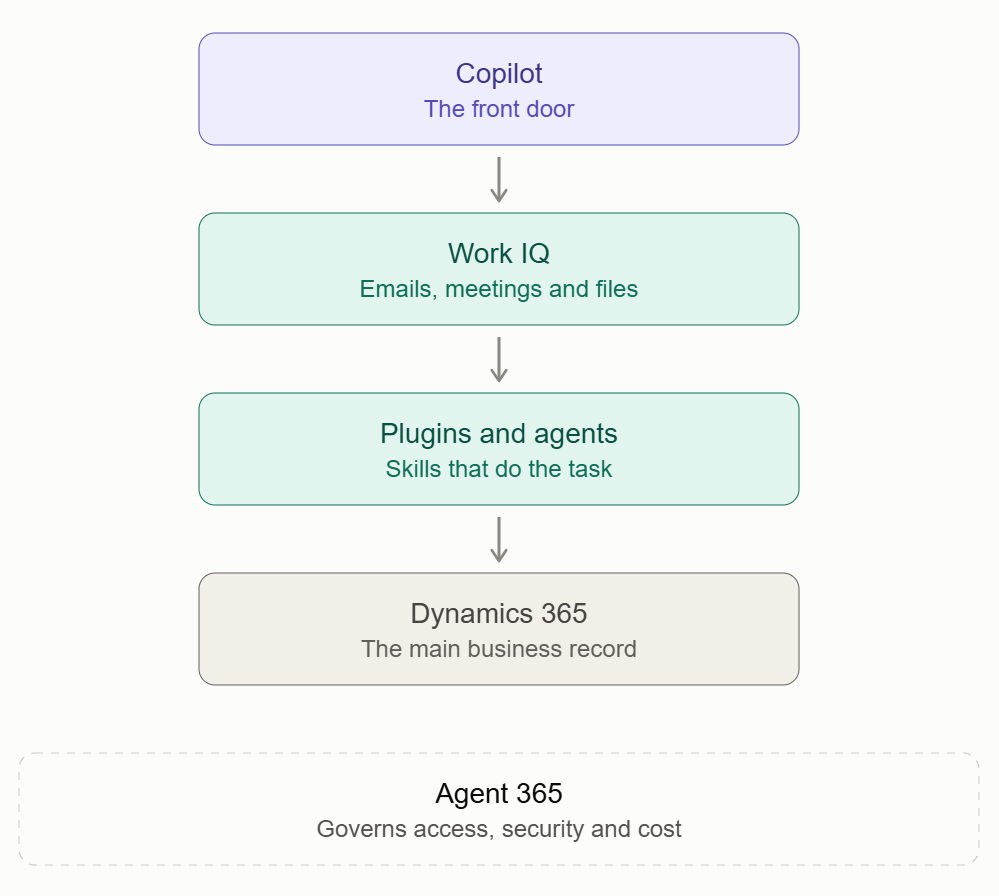
Microsoft calls Copilot the new front door to Dynamics 365. In practice, plugins teach it how your business works. Each plugin packages the know-how for one job. Examples include preparing for a customer meeting or approving a purchase order. Each plugin also includes the secure access needed to do the work.
Behind that sit two more pieces. Work IQ gives Copilot and agents context from your emails, meetings and files. Meanwhile, Agent 365 lets IT secure, manage and cost every agent. Dynamics 365 stays the main record for your customer, finance and supply chain data. In addition, your existing permissions still apply.
The drawing below shows how the pieces fit together.
What Microsoft announced
| Component | What it does | Status (November 2026) |
|---|---|---|
| Sales plugin | Account plans, meeting prep, deal catch-up, pipeline priorities | Generally available |
| Customer Service plugin | Service skills, taking the total past 57 with Sales | Generally available |
| ERP apps plugin | 39+ finance and operations skills, with a stronger Excel link | Generally available |
| Work IQ with Dynamics 365 data | Plain-language updates to records and journal entries | Announced at Ignite |
| Agent Accounts | Agents with their own identity, memory and triggers | Public preview from December 2026 |
| Contact Center Intelligence | AI agents layered on your current contact centre platform | Generally available |
| Agent 365 Cost Management | Spending policies, limits, alerts and departmental chargeback | Available in the Microsoft 365 admin centre |
How Does Dynamics 365 Copilot Help Finance Teams?
Finance work is full of small steps that wait on other people. For instance, the DBT’s 2025 research puts the cost of late payments to the UK economy at almost £11 billion a year. Also, affected businesses spend an average of 86 hours a year chasing money. In short, the effort sits in the follow-up, not the analysis.
First, Microsoft has updated the Dynamics 365 ERP apps plugin with more than 39 finance and operations skills. It also widens the connection to Excel, where many finance teams already work. Next, Dynamics 365 data now connects natively with Work IQ. As a result, people can use plain language to update records or prepare journal entries. Existing permissions stay in force.
Where this could help:
- Month-end: a draft journal entry to review, instead of one built from scratch.
- Credit control: a clear list of invoices still waiting on a reply.
- Budget reviews: figures pulled into Excel, with gaps flagged for budget owners.
Additionally, Agent Accounts with memory and triggers, enter public preview in December 2026. For finance, this points towards agents that remember what is still open and follow up on a schedule. We cover the idea in our guide to persistent AI agents in Copilot Studio.
How Does Dynamics 365 Copilot Help Sales Teams?
Salesforce’s 2026 State of Sales report found UK sellers spend 41% of their time selling. The rest goes on research, data entry and prep. In the same survey, UK sellers expected AI agents to cut prospect research and email drafting time by 38% each. However, that is an expectation, not a measured result.
First, the updated Dynamics 365 Sales plugin lets sellers build account plans, prepare for customer meetings and catch up on deals. They can also prioritise pipeline without leaving Copilot. Then, new deal insights track progress against the quarterly forecast. They also map decision makers and flag risks. Finally, sellers can create PowerPoint presentations, adapt old decks for a new customer and refresh slide data.
For example, Microsoft’s own sales team saw more than a 25% drop in seller effort on account planning, meeting prep and proposals. They also saw a 9% gain in deal closure speed. However, these figures come from Microsoft’s internal data. So, treat them as a guide, not a forecast for your team.
How Does Dynamics 365 Copilot Help Operations Teams?
Operations is where UK adoption is thinnest. For example, Make UK’s June 2026 report found only 11% of manufacturers use AI in production. Likewise, only 7% use it in supply chain and 6% in quality control. In addition, over half named skills shortages as the main barrier.
The ERP apps plugin shows a sensible first step. For instance, in Source-to-Pay, a sourcing lead can handle purchase requisitions. They can also create requests for quotes and manage purchase orders in Dynamics 365 Supply Chain Management.
Two other announcements also matter here. First, Contact Center Intelligence is now generally available. It adds AI agents for voice and digital channels on top of your current contact centre platform. As a result, you don’t have to replace it. Second, Dynamics 365 Activate for ERP is in private preview. It starts with SAP ECC discovery. This helps teams decide what to move, simplify or redesign. That matters because the system is nearing the end of mainstream maintenance.
Before and after: working with Dynamics 365 Copilot
| Area | Before | With Dynamics 365 Copilot |
|---|---|---|
| Finance | Switching between Excel, the ERP and email | Plain-language requests in Copilot, permissions kept |
| Sales | Prep spread across several tools | Account plan and meeting prep from one place |
| Operations | Requisitions and quotes handled by hand | Skills for requests, quotes and orders, with a person approving |
| Service | Replacing the contact centre to add AI | Agents added to the platform already in use |
Industrial Applications of Dynamics 365 Copilot
These are examples of where the approach could fit, not guarantees of what any product does out of the box.
Healthcare
UK healthcare organisations balance clinical, regulatory and workforce demands on tight budgets, and every hour of paperwork is an hour away from patients. Still, NHS England is already moving. A trial across 30,000 staff in 90 organisations saved an average of 43 minutes of admin per person per day, about five weeks a year. Microsoft 365 Copilot is now being rolled out to more than 500,000 NHS staff, and the rollout should finish by October 2026. NHS organisations also get access to Copilot Studio to build their own agents.
Dynamics 365 adds the business side. For example, a trust finance team could prepare journal entries and budget reviews in Excel and Copilot. Similarly, procurement could manage requisitions and quotes for consumables and facilities services through Supply Chain Management. Also, patient contact and complaints teams could add AI agents to existing phone and digital channels through Contact Center Intelligence. However, patient data needs extra care. So, involve your information governance lead. Then check your UK GDPR duties before any agent touches personal data.
Non-profit
UK charities face rising demand, tight funding and growing reporting duties to funders, trustees and regulators, usually with small teams. The Charity Digital Skills Report 2026 found 79% of charities routinely use AI. But only 36% of small charities have an AI policy, and 46% have no trustee with digital skills. Use is ahead of structure.
A scoped approach helps here. Finance teams can use the ERP skills for month-end and funder reporting packs. Second, if your team tracks funders in Dynamics 365, a partnerships lead could use the same account planning and meeting prep that sellers use. That would help them prepare for a funder conversation. Finally, Agent 365 Cost Management matters too. This is because spending policies, limits and alerts keep usage-based AI inside a budget your trustees can approve.
Finance and accounting
Finance teams spend much of the month chasing coding, approvals and replies. Typical jobs include weekly budget reviews, missing coding and month-end follow-ups. For example, with the ERP apps plugin and the Excel link, a team could prepare these in Copilot. In addition, a person would still sign off. As the DBT figures show, the time goes on chasing. So, agents with memory and triggers could help carry that party.
Retail and distribution
Supplier order follow-ups and delivery queries fill much of a distribution team’s day. Meanwhile, analysis of ONS survey data suggests AI adoption in retail and manufacturing lags behind the wider UK economy. So, there is room to get ahead. For example, a buying team could use Supply Chain Management skills to raise requests and manage purchase orders. In addition, an agent could track late deliveries and tell the right person.
Professional services
Onboarding a new client means collecting documents, chasing signatures and keeping everyone informed. First, the Sales plugin skills can help with account plans, meeting prep and proposals. These include PowerPoint decks adapted for each client. Then, an agent with memory could track which client documents are still missing. As a result, the team spends more time on advice and less on chasing.
Manufacturing
Manufacturers deal with supplier delays and must keep purchasing and production informed. However, only 11% of UK manufacturers use AI in production and 7% in supply chain. So, most of the gain is still ahead. A simple start is the Source-to-Pay skills in Dynamics 365 Supply Chain Management. Next, an agent could follow up supplier delays and update the team.
HR
HR teams handle onboarding, approvals and exceptions across many departments. For example, a new starter needs equipment, access and training in the right order. In that case, an app could track readiness. Likewise, workflows could handle approvals, and an agent could manage the exceptions. However, a person in HR still makes the final call.
Customer service
Customer service teams start the day with a long list of cases. First, the Customer Service plugin is now generally available and brings service skills into Copilot. As a result, an adviser can review priority cases and update records from one place. In addition, Contact Center Intelligence adds AI agents for voice and digital channels on top of your current platform. So, you don’t need to replace it.
What Should You Check Before You Start?
- Permissions: agents work within the access you give them, so review roles first.
- Cost: set spending limits and alerts in Agent 365 before anyone builds.
- Decisions: keep approvals with a named person.
- Data protection: UK GDPR applies whenever an agent handles personal data.
- Previews: features in preview can change before general release.
What’s Next for Dynamics 365 Copilot?
Agent Accounts reach public preview in December 2026. Dynamics 365 Activate for ERP is still in private preview. Agent 365 adds value insights across Microsoft and non-Microsoft AI services in December. Microsoft’s Convergence event runs from 8 to 11 December 2026, which is a good moment to watch for more.
How Mazik Global Can Help with Dynamics 365 Copilot
The safest way to begin is small and specific. We suggest four phases.
Phase 1: Choose one process. Pick a task that repeats, involves chasing people and has a clear owner, such as month-end follow-up or funder reporting.
Phase 2: Prepare the ground. Check your data quality, permissions and Microsoft licensing, and agree who approves what.
Phase 3: Run a pilot. Roll out to one team, with checkpoints where a person reviews the work.
Phase 4: Govern and grow. Set spending limits and monitoring, then move to the next process.
Our services cover:
- Dynamics 365 Copilot setup across Finance, Sales and Supply Chain Management
- Copilot Studio agent design and build
- Connecting agents to Microsoft 365 and Power Platform
- Governance and cost control planning
- Team training and handover
- Healthcare and non-profit solutions through MazikCare and MazikNFP
Final Thoughts
Dynamics 365 Copilot moves the business application to where people already work. The routine steps get lighter, and people stay in charge of decisions.
Key Takeaways
- Copilot is now the front door to Dynamics 365, with plugins for sales, service, finance and operations.
- UK use of AI is growing but still shallow, especially in operations, so there is real room to improve.
- Start with one repeatable process. Then keep a person in the approval seat and set cost limits early.
If you would like to see where Dynamics 365 Copilot could take on the chasing in your organisation, contact the Mazik Global team.