Copilot Cowork vs Chat: What Should UK Leaders Know?
Copilot Cowork vs Chat is a question many UK boards will face soon. Most firms already use some AI. However, the harder question is which kind of AI suits which kind of work. Also, getting that wrong can be costly.
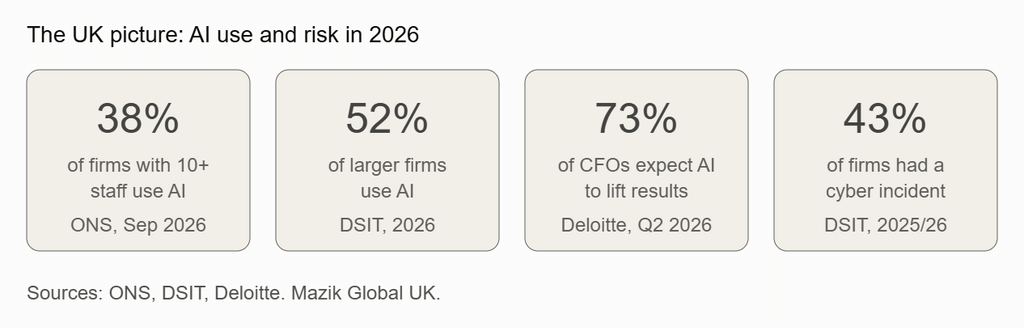
The adoption numbers show why this matters. ONS data shows 38% of UK businesses with 10 or more employees used AI in September 2026, up 26 percentage points since September 2023. In addition, the Government’s own survey found uptake of 52% among larger firms. Meanwhile, finance leaders are growing more hopeful. Deloitte’s Q2 2026 CFO Survey found 73% of UK CFOs believe AI will materially improve business performance, up from 39% in Q3 2024. 1. Main points +2
Hope is not a plan, though. Microsoft 365 Copilot now offers both Chat and Cowork, and they look alike on screen. However, they do different jobs and are billed in different ways. As a result, a clear view of both helps you spend where it pays back.
This blog explains how the two tools differ and what the UK evidence says. Then it covers cost, control and risk, and ends with a simple way to choose. If you want wider context first, read our guide to persistent AI agents in Microsoft Copilot Studio. The first graphic below shows the UK picture in four numbers.
What Is the Difference Between Copilot Cowork vs Chat?
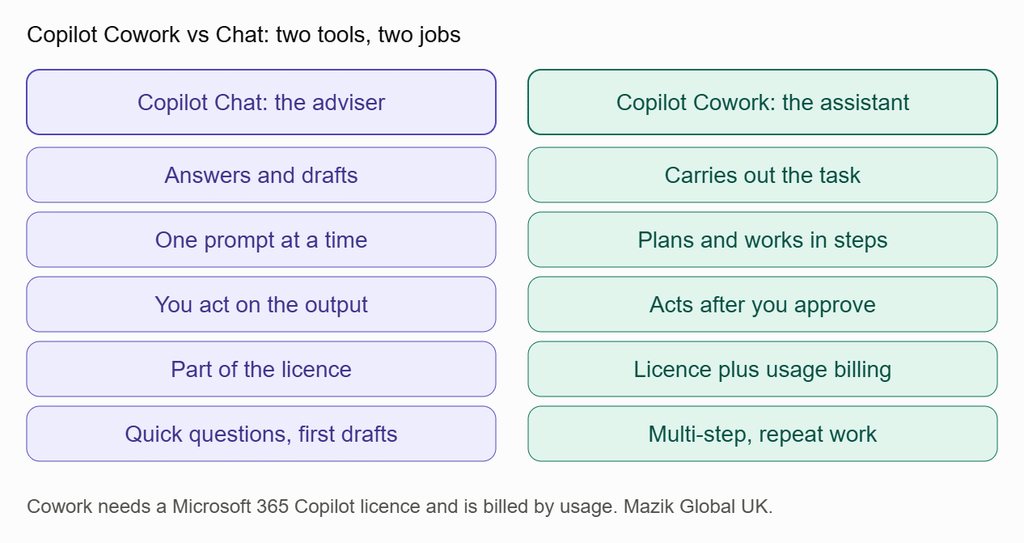
The simplest way to see it is this. Chat helps you think and write. Cowork, however, helps you get things done.
Copilot Chat works as a conversation. First, you ask a question. Then it drafts, summarises, searches or analyses. After that, you take the answer and act on it yourself.
Copilot Cowork goes one step further. You describe what you need, and Cowork sends emails, schedules meetings, creates documents, posts in Teams and manages your calendar. Also, it builds a plan, works through it in steps, and asks for your approval before it takes actions that affect real communications, files or schedules. microsoftdatacamp
In short, Chat is a sharp adviser who answers every question you put to them. Cowork is closer to a capable assistant. It takes the brief and does the legwork. Then it checks in before anything goes out.
What Is Copilot Chat Best Used For?
Chat suits quick, single-step work. Also, it keeps you in control of every move.
- Drafting. First versions of emails, reports and board papers.
- Summaries. Long email threads, meeting notes and policy documents in a few lines.
- Questions. Finding facts across your files, emails and chats.
- Analysis. Making sense of a spreadsheet or comparing two documents.
The value here is time saved on small tasks, many times a day. For example, a Government trial with more than 20,000 civil servants found that Microsoft 365 Copilot saved users 26 minutes a day on average. In addition, that trial covered everyday tasks such as drafting, summarising emails and preparing reports. gov.uk
What Is Copilot Cowork Best Used For?
Cowork suits work that has several steps, involves other people, or comes round again and again.
- Multi-step tasks. It breaks a request into steps and shows its progress, so you can steer at any point.
- Work across apps. It can work across Outlook, Teams, Excel and other Microsoft 365 services. businesstoday
- Checkpoints. You can review progress, make changes, and pause or stop the task. businesstoday
- Scheduled work. You can schedule tasks to run on a recurring basis, such as daily briefings or weekly digests. microsoft
- Business context. It draws on your emails, meetings, files and chats, so the work reflects what is actually going on.
In practice, Cowork fits best when the effort lies in coordinating, chasing and following up rather than in thinking. Therefore, it is worth testing first in finance, operations and admin teams. The next graphic puts the two tools side by side.
Why Copilot Cowork vs Chat Matters to the Board
The choice is not really about technology. Instead, it is about where your people lose time. It is also about how much risk you accept to get that time back.
For a CEO, the question is capacity. Senior teams lose hours to coordination, so that time is not spent on customers or growth. For a CFO, there are two questions. First, is the saving real? Second, is the bill predictable? Finally, both need to know who is accountable when an AI tool acts for the company.
Chat is easy to reason about because a person sits between the answer and the action. Cowork, however, removes some of that gap. As a result, it saves more time. For the same reason, approvals and spending limits matter.
Copilot Cowork vs Chat in Action: A Month-End Follow-Up
Here is an example of how the two could work together in a finance team. However, it only illustrates the approach. It is not a guarantee of what any product does out of the box.
- First, the finance controller uses Chat to summarise last month’s variances and draft questions for budget owners.
- Then, the controller asks Cowork to send those questions to the right people and book a review meeting.
- Next, Cowork tracks the replies and keeps a list of what is still outstanding.
- If a reply is late, it prepares a reminder and asks the controller to approve it before sending.
- Afterwards, it gathers the answers into one summary document.
- Finally, the finance director reads the summary and makes the decisions. The tool never does.
Before vs After: Chat Only Compared with Chat and Cowork
| Area | Chat only | Chat plus Cowork |
|---|---|---|
| Drafting and summaries | Fast and useful | Same |
| Chasing replies | Done by hand | Tracked and prompted for you |
| Repeat reports | Someone must remember | Can run on a schedule |
| Moving between apps | Copy and paste | Work carried across Outlook, Teams and Office files |
| Approvals | Always manual | Built in at checkpoints |
| Cost visibility | Fixed licence fee | Licence fee plus usage charges |
The UK Perspective on Copilot Cowork vs Chat
The UK evidence points in one direction. First, AI saves time on routine work. Second, the saving varies from one organisation to the next.
The large Government trial found a 26-minute daily saving. However, a separate evaluation of the Department for Work and Pensions trial estimated an average saving of 19 minutes a day. Both are meaningful. Still, the gap is a useful reminder for any CFO building a business case. Therefore, plan with a range, not a single number.
One more point deserves honesty. These trials looked at Copilot in everyday apps and chat. Also, they ran before Cowork was widely available. As a result, we have not yet seen independent UK figures for Cowork itself. For now, treat Cowork’s value as something to prove in your own pilot.
Which One Is Right for Your Business?
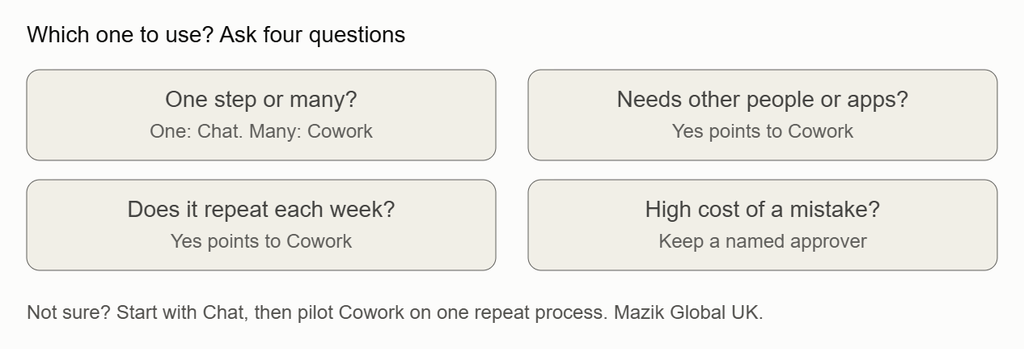
Most organisations will end up using both. Instead of picking one, ask which tool to reach for first, task by task. Four plain questions help.
- Is it one step or many? One step points to Chat. Many steps point to Cowork.
- Does it need other people or other apps? If so, Cowork saves more time.
- Does it repeat? Weekly and monthly tasks are strong candidates for Cowork.
- What happens if it goes wrong? If a mistake would be costly, keep a person in the loop and keep the first pilots small.
The final graphic turns these four questions into a quick guide.
Cost, Control and Risk in Copilot Cowork vs Chat
This is the section many CFOs will turn to first, so it is worth reading carefully.
Cost:
Copilot Cowork requires the Microsoft 365 Copilot user licence, and users are then billed for Cowork on a usage basis. In other words, the licence is a fixed cost, while Cowork adds a variable one. Also, heavier tasks use more Copilot Credits than light ones. Microsoft’s published pay-as-you-go rate is $0.01 per Copilot Credit, with a discounted prepaid option. Therefore, ask our Microsoft licensing team to translate this into sterling for your own agreement.
Control:
Microsoft states that prompts, responses and artefacts in Cowork flow through existing Microsoft 365 controls. In addition, it says cost management was a key part of the general release. So, set limits and alerts before you roll Cowork out widely.
Risk:
The UK security data is a good reason for care. The 2025/26 Cyber Security Breaches Survey found that 43% of businesses had a breach or attack in the past 12 months. Also, only 24% of businesses using, adopting or considering AI had measures in place to manage the related risks. Because Cowork can send an email on your behalf, that gap matters. Similarly, UK GDPR still applies whenever personal data is involved, so bring your data protection lead in early. An AI assessment is a sensible first step.
Industry Applications of Copilot Cowork vs Chat
The pattern is the same across sectors. Chat helps individuals work faster, while Cowork helps teams keep a process moving. However, these are examples of where each could fit, not promises of what any product does out of the box.
Healthcare
UK healthcare organisations carry heavy admin loads alongside tight budgets. As a result, every hour spent chasing paperwork is an hour taken from patient care. The direction of travel is clear. NHS England has announced that Microsoft 365 Copilot will reach more than 500,000 NHS staff. See how we support healthcare organisations with Microsoft technology.
In this setting, Chat can summarise a long policy document or draft a reply to a patient query for a member of staff to check. Cowork, on the other hand, suits the slower jobs. For instance, a complaint needs answers from several teams and a deadline to be tracked. Similarly, a Freedom of Information request needs information gathered and chased. Cowork could keep track of what is outstanding and chase the right person. Meanwhile, a named member of staff approves anything that goes out.
Non-profit organisations
UK charities face rising demand, tight funding and growing reporting duties, often with small teams. AI is already common in the sector. The Charity Digital Skills Report 2026 found that 79% of charities routinely use AI. However, 44% are taking no action to manage AI risks. In short, use is wide, but the safeguards often lag behind. Learn more about our work with non-profits.
For a charity, Chat can draft a donor thank-you note or tidy a funding bid. Cowork, by contrast, suits recurring work such as the trustee pack. It could collect updates from project leads, chase missing figures and assemble a first summary before each meeting. Even then, the finance or programme lead reviews everything before it reaches trustees.
Finance and accounting
Chat for variance summaries. Cowork for month-end follow-ups and chasing missing approvals.
Retail and distribution
Chat for supplier email drafts. Cowork for tracking order updates and delivery queries.
Professional services
Chat for proposal drafts. Cowork for gathering client documents and keeping onboarding on track.
Manufacturing
Chat for summarising supplier reports. Cowork for following up on delays and keeping purchasing informed.
HR
Chat for job descriptions and policy questions. Cowork for onboarding schedules and reminders.
Customer service
Chat for drafting replies. Cowork for tracking open cases across teams.
What’s Next for Copilot Cowork vs Chat?
Things are still moving. Cowork reached general availability on 16 June 2026. Since then, Microsoft has added new options, and some started in its early access programme before reaching everyone. Therefore, check what your own tenant can use before you plan around a feature. Also, review your spending limits every quarter, because usage tends to grow once people see the value.
How Mazik UK Can Help with Copilot Cowork vs Chat
The safest way to begin is small and specific. We suggest four phases.
Phase 1: Choose one process. First, pick a task that repeats, involves chasing people and has a clear owner. Month-end follow-ups and board pack preparation are good starting points.
Phase 2: Prepare the ground. Next, check your Microsoft 365 licences, data permissions and approval rules. Then agree who signs off what.
Phase 3: Run a pilot. After that, run Chat and Cowork side by side with one team. Record time saved and credits used, so the business case rests on your own figures.
Phase 4: Govern and grow. Finally, set spending limits, monitor usage and extend to the next process.
Our services cover:
- Microsoft 365 Copilot rollout and adoption
- AI assessment and readiness
- Copilot Studio agent design and build
- AI managed services for governance and cost control
- Digital workplace managed services and team training
Frequently Asked Questions About Copilot Cowork vs Chat
Chat answers questions and drafts content, and then you act on the result. Cowork, however, takes a goal, makes a plan and carries out the steps across your Microsoft 365 apps. Also, it asks for your approval before it takes actions that affect real communications, files or schedules.
You need the Microsoft 365 Copilot user licence first. Cowork is then billed on a usage basis, with charges set by the tasks you run. So, the licence is a fixed cost and Cowork adds a variable one.
It uses Copilot Credits, and heavier tasks use more credits than light ones. Microsoft’s published pay-as-you-go rate is $0.01 per credit, with a discounted prepaid option. However, your agreement may differ. Therefore, check the sterling price with your Microsoft licensing partner before you set a budget.
It is designed to ask first. Cowork asks for your approval before actions that affect real communications, files or schedules. Also, you can pause or stop a task at any checkpoint. For anything that leaves the business, it is wise to add extra review points.
Microsoft says prompts, responses and artefacts in Cowork flow through existing Microsoft 365 controls. That helps, but it does not replace your own checks. Because UK GDPR still applies where personal data is involved, involve your data protection lead and review permissions before a wider rollout.
UK trials give a range. The Government trial reported an average of 26 minutes a day, while the DWP evaluation estimated 19 minutes a day. However, both studied Copilot in everyday apps and chat. As a result, we have not seen independent UK figures for Cowork yet, so measure it in your own pilot.
Yes. Microsoft made Cowork generally available on 16 June 2026. Even so, some extra options may still be rolling out, so check what your own organisation can use.
Most firms start with Chat, because it is simple and low risk. Then they pick one repeat process, such as month-end follow-ups, and pilot Cowork there. In addition, they name an approver and set clear spending limits.
Final Thoughts
Copilot Cowork vs Chat is not a contest with one winner. Chat gives every employee a quicker way to think and write. Cowork, meanwhile, takes on the follow-up work that eats into a week. Overall, the right mix depends on your processes, your appetite for risk and your budget. A short pilot will tell you more than any forecast.
Key Takeaways
- Chat helps with thinking and writing. Cowork carries out multi-step tasks, with your approval.
- Cowork needs the Microsoft 365 Copilot licence and is then billed by usage, so set limits early.
- UK trials show real time savings from Copilot, but the range is wide. Prove the value in your own pilot.
- Start with one repeat process and keep a named person as the approver.
If you would like help deciding where Chat and Cowork fit in your business, contact the Mazik Global team.