
AI agents in Microsoft Copilot are changing how UK businesses think about AI. Most UK businesses already have AI somewhere. The question leaders are now sitting with is not whether to try it. It is whether it changes how the work gets done. ONS figures show 38% of UK businesses with 10 or more employees were using AI in September 2026, up 26 percentage points since September 2023. Adoption is no longer the story. Depth is.
Only 10% of those adopters report extensive use, which suggests most firms bought a tool without changing a process. Part of the reason is that most AI tools wait to be asked. In practice, you type a request, you get an answer, and the conversation ends. Meanwhile, the work that really drains a week is chasing replies, checking figures, and keeping track of what is still open. UK business owners estimate they spend 11 hours a week on administrative or finance tasks, twice as long as they spend growing the business.
On 4 November 2026, Microsoft published its October update for Copilot Studio, and the headline change is for AI agents in Microsoft Copilot Studio is “Persistent Agents”. They remember what happened last time, start work without prompts, and follow things up until they are completed.
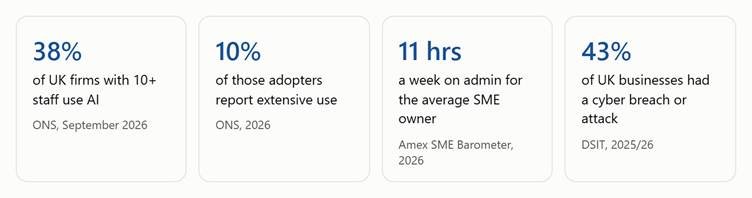
Infographic of UK statistics on AI adoption, admin hours and cyber breaches, relevant to Persistent AI agents in Microsoft Copilot Studio
This blog explains what persistent AI agents in Microsoft Copilot are, how Microsoft Copilot Studio delivers them, what the UK data says about readiness, and how to start without taking on unnecessary risk.
Most AI tools were built to respond. They draft an email, summarise a document, or answer a question, and they do it well. But every task starts with a person and ends when the chat closes. The agent has no memory of last week, no way of notifying an approaching deadline, and no follow-up on its own.
That model works for single tasks. However, it struggles with processes that run for days and involve people. Think of the weekly budget review. First, someone pulls the figures, spots the gaps, emails the budget owners, and then waits. Then, when replies arrive, someone must read them, update the numbers, and remember who has not answered. The coordination takes more effort than the analysis, and it falls on whoever happens to be paying attention. For instance, Starling Bank found that UK micro-businesses spend 15 hours a week on finance admin, 19% of their working time.
A standard agent behaves like a helpful stranger. Ask a good question, and you get a satisfactory answer, but it forgets you once the chat closes.
A persistent agent behaves more like a colleague. It has its own account, remembers what already happened, and works when a date or an event is involved. For example, you can hand it a task by @-mentioning it in Teams, Outlook, or an Office file, the same way you would ask a coworker.
One point on timing. Agent accounts are in private preview through Microsoft’s Frontier programme, so check availability for your organisation before planning around them.
Copilot Studio is Microsoft’s platform for building AI agents, apps, and workflows without needing a team of developers. It uses low-code tools and plain-language instructions, so the people who understand the work, such as an HR specialist or a finance controller, can shape the solution themselves. In addition, it controls testing, governance, and deployment. Overall, the October update adds three areas that matter most for everyday business use.
| Component | Component’s Functionality | Status (October 2026) |
| Agent accounts | Gives an agent its own approved credentials and limited permissions | Private preview (Frontier) |
| Business process memory | Keeps useful context between tasks | Announced with agent accounts |
| Triggers | Starts work on a schedule or when an event happens | Announced with agent accounts |
| Work IQ | Lets agents draw on emails, meetings, files, and conversations | Available |
| Agent2Agent (A2A) | Let specialist agents hand tasks to each other, including agents built elsewhere | Supported in the Microsoft Copilot harness |
| Workflow upgrades | Extract details from documents, call Copilot, co-author with colleagues | Available |
| Cost management | Shows Copilot Credit use to makers and admins | Admin centre view in preview |
Until now, most AI at work has followed one pattern: you ask, it answers. However, that helps with single tasks but does little for processes that involve people & time.
Persistent AI agents in Microsoft Copilot change who holds the thread. Instead of a person remembering to chase, check, and update, the agent does, and the person decides. Microsoft’s own framing is that the real measure is how much meaningful work organisations can confidently entrust to agents, not the number of tasks they can finish. Notice the word confidently. After all, trust must be earned, and that is why the controls matter as much as the features.
Microsoft’s own example is a weekly budget review. Here is how the pieces fit together.
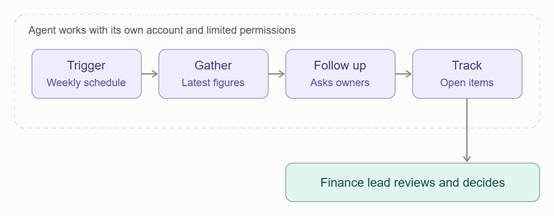
Workflow diagram of a weekly budget review run by Persistent AI agents in Microsoft Copilot Studio
As a result, the team spends less time collecting updates and more time deciding what to do about them.
| Area | Without a persistent agent | With a persistent agent |
| Starting work | Someone remembers to begin | A schedule or event starts it |
| Context | Rebuilt from scratch each time | Carried forward through memory |
| Chasing replies | Manual emails and reminders | Agent follows up and tracks answers |
| Where you ask | A separate tool or portal | Teams, Outlook, or Office files |
| Decisions | Made late, after the admin | Made with the facts already gathered |
| Cost visibility | Often unclear | Credits visible to makers and admins |
The ONS reports that adoption among firms with 10 or more employees has risen from about 12% in late 2023 to 35% by June 2026. Meanwhile, the Government’s own AI adoption survey, published on 29 October 2026, found 32% of UK businesses using at least one AI technology, double the 16% recorded in 2025, with uptake among larger firms at 52%. The two surveys measure slightly different things, which explains the gap, but the direction is the same.
The pattern underneath is what matters. Adoption is wide and shallow. In other words, most firms have bought a tool, but few have changed how work moves from one person to the next. The ONS found that 38% of AI-using firms said administrative and clerical roles were the most affected, which fits the picture. AI is already touching routine work, but one task at a time.
Persistent agents fill that gap. In fact, the organisations that benefit will not be the ones that add more software. They will be the ones that decide which parts of a process need human judgement and which parts an agent can carry reliably, week after week.
Organisations do not know how much to build themselves. The sensible approach is to start with a small, well-defined process, see what the agent delivers in your own environment, and then extend it. Microsoft has made this accessible to a range of technical levels.
For business users, Copilot Studio skills in Cowork, available through the Frontier programme to users with a Microsoft 365 licence, let makers describe a need in plain language and use existing files and policies to design an agent, app, or workflow.
For developer teams, the new Copilot Studio MCP server brings Copilot Studio into tools such as GitHub Copilot, Claude Code and OpenAI’s Codex, so they can create, evaluate, and publish agents without leaving their usual environment. In addition, workflow upgrades that reached general availability in October help too. For example, an Extract step pulls details from documents, emails, and images; workflows can call Copilot directly, and teams can co-author them. Finally, makers can also complete connector setup from within the conversation rather than hunting through a separate portal.
An agent is only as useful as the information it can reach and the controls around it. That is why the platform matters as much as the agent.
On the information side, Work IQ is now generally available in Copilot Studio. It gives agents a unified view across emails, meetings, files, conversations, and organisational relationships, so they respond with a better understanding of the work at hand. For example, an agent that knows the history behind a request produces quite different results from one working from a single prompt.
Giving an agent real work means giving it real access, so the questions to ask first are about control.
The UK security data shows why this deserves attention. The Government’s Cyber Security Breaches Survey found 43% of businesses reported a breach or attack in the last 12 months, and only 25% had a formal incident response plan. Also, only 24% of businesses using AI have any practice in place to manage the related cyber risk. UK GDPR also still applies whenever an agent touches personal data, so involve your data protection lead early.
Persistent agents are not a single-industry story. The processes vary, but the pattern is consistent: agents follow up, handle volume while people focus on judgement. However, these are examples of where the approach could fit, not guarantees of what any product does out of the box.
Healthcare organisations in the UK, whether NHS trusts, independent providers or private hospital groups, manage clinical, regulatory and workforce demands at the same time as tight budgets. Back-office effort is not a side issue in that setting. In fact, every hour spent chasing paperwork is an hour not spent on patient care.
The direction of travel is already set. NHS England has announced that Microsoft 365 Copilot will reach more than 500,000 NHS staff, with a target of completing the rollout by October 2026. Copilot Studio is part of that plan. NHS England can build and deploy agents centrally, and individual trusts can build custom agents for challenges such as reducing helpdesk workloads, processing complaints, handling Freedom of Information requests and supporting financial analysis.
Additionally, NHS England has estimated that the tools could save about two days of administrative time a month for each member of staff. However, that is an estimate from its trial rather than a guarantee, but it shows the scale of time at stake.
Persistent agents suit this kind of work because so much of it runs over days and passes between departments. For example, a complaint needs responses from several teams and a deadline to be tracked. Similarly, an FOI request needs information gathered and chased. Also, supplier follow-ups for medical consumables and facilities services depend on someone noticing a delay early. An agent with memory and triggers can keep track of what is outstanding, chase the right person and give a manager a clear summary, while the decision stays with a named member of staff. This matters because acute trust productivity rose by 2.7% between April 2024 and March 2025, according to the Government, and administrative effort is one of the clearest places left to find capacity.
UK charities and non-profits operate under a particular set of pressures. Demand for services keeps rising, funding is tight and reporting obligations to funders, trustees and regulators keep growing. The teams meeting those demands are usually small and already stretched. AI is already in the sector. The Charity Digital Skills Report 2026 found that 79% of charities routinely use AI, up from 76% a year earlier. However, the same report found that 44% of charities are taking no action to manage AI risks, only 36% of small charities have an AI policy and 46% have no trustee with digital skills. Use is widespread, but the structure around it often is not.
That gap is where a carefully scoped persistent agent can help. For example, think of the grant reporting cycle. Someone must collect spending figures from project leads, chase narrative updates, check progress against the funder’s conditions and keep a list of what is still missing before the deadline. It runs over weeks, involves many people and relies on one person’s memory. In contrast, an agent with memory and triggers can run that follow-up in the background and bring a ready summary to the finance or programme lead. Likewise, The same approach suits volunteer onboarding, donation and Gift Aid administration, and the reporting packs that trustees need before each meeting.
Weekly budget reviews, chasing missing coding or approvals, month-end follow-ups.
Supplier order follow-ups and delivery queries. ONS data reported by Retail Week shows wholesale and retail among the slower adopters, so there is room to get ahead.
Collecting client documents, reading them with the Extract step, and keeping onboarding moving.
Following up on supplier delays and keeping purchasing and production informed.
Microsoft’s example is employee onboarding, with an app to track readiness, workflows for approvals, and an agent to manage exceptions.
The new customer conversation tool (Microsoft calls it a harness), currently in preview, supports voice and chat. It uses specialist sub-agents for billing, account support, or troubleshooting, with a clear route to a human.
Several pieces are still moving, and preview features can change before they reach general release.
The safest way to begin with AI agents in Microsoft Copilot is small and specific. We suggest four phases.
Phase 1: Choose one process. Pick a task that repeats, involves chasing people, and has a clear owner. For example, weekly reporting and onboarding are good starting points.
Phase 2: Prepare the ground. Next, check your data, permissions, and Microsoft 365 licensing, and agree on who approves what.
Phase 3: Run a pilot. Then, build one agent for one team, with clear checkpoints where a person reviews the work.
Phase 4: Govern and grow. Finally, set spending limits and monitoring, then extend to the next process.
Persistent AI agents in Microsoft Copilot are a change that fits AI into the working week. They move from answering questions to carrying work forward, while people stay in charge of the decisions that matter.
Three things to take away from this:
If you would like to see where persistent AI agents in Microsoft Copilot could take on the chasing in your business, contact the Mazik Global team.

Microsoft Ignite 2026 Day 1 Keynote: Copilot Becomes the New OS for Work Microsoft Ignite 2026 opened on 17 November…
AI Agents in Microsoft Copilot AI agents in Microsoft Copilot are changing how UK businesses think about AI. Most UK…
Every contact centre supervisor knows the feeling. A queue builds, wait times creep up, and the report that explains it…