
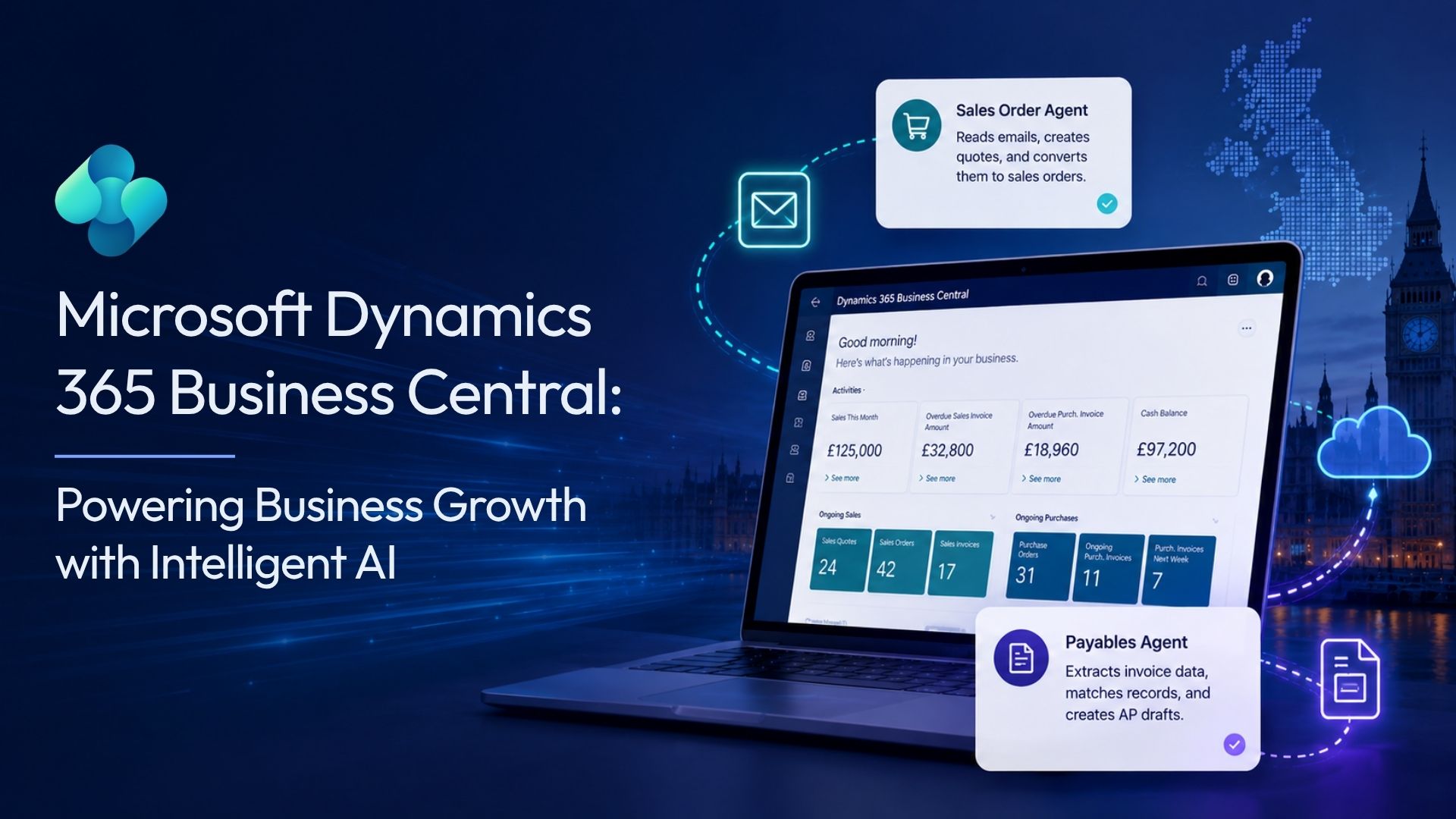
For years, ERP systems were built around a simple premise: give people a place to record what happened. Someone creates a purchase order, someone matches the invoice, someone posts the journal. The system holds the data. The people do the work.
That premise is shifting. 73% of SMBs are already using AI tools in their business operations, and 91% of AI-adopting SMBs report that AI has boosted their revenue. Looking ahead, 3 in 5 small businesses plan to implement AI within the next two years, and 78% of high-growth SMBs plan to increase their AI spending next year. The question for business leaders is no longer whether AI is relevant to operations. It is whether their current systems are set up to act on it.
Microsoft Dynamics 365 Business Central has an answer to that question. The platform now ships with built-in AI agents that manage specific, end-to-end business tasks without waiting for each step. These are not chat assistants. They are task-oriented agents that monitor, interpret, decide, and act within boundaries you define.
Dynamics 365 Business Central is Microsoft’s cloud-based ERP platform for small and medium-sized organisations. It manages finances, supply chain, sales, purchasing, manufacturing, and more within a single connected environment.
It integrates natively with Microsoft 365, Power Platform, and Azure AI services. As of 2025, Business Central includes Copilot, built-in autonomous agents, and the flexibility to add custom AI, making it one of the most capable ERP platforms available to UK SMBs today.
AI agents in Business Central are purposeful automations that manage complete business processes, not just individual tasks. When an agent is active, it reads relevant inputs, reasons through a defined workflow, acts, and logs every step for human review.
Unlike Copilot features, which respond when a user asks, agents operate continuously. They monitor inboxes, review documents, match records, and create drafts without requiring a user to initiate each step. The result is a system that not just helps with your teamwork but also collaborates with your team.
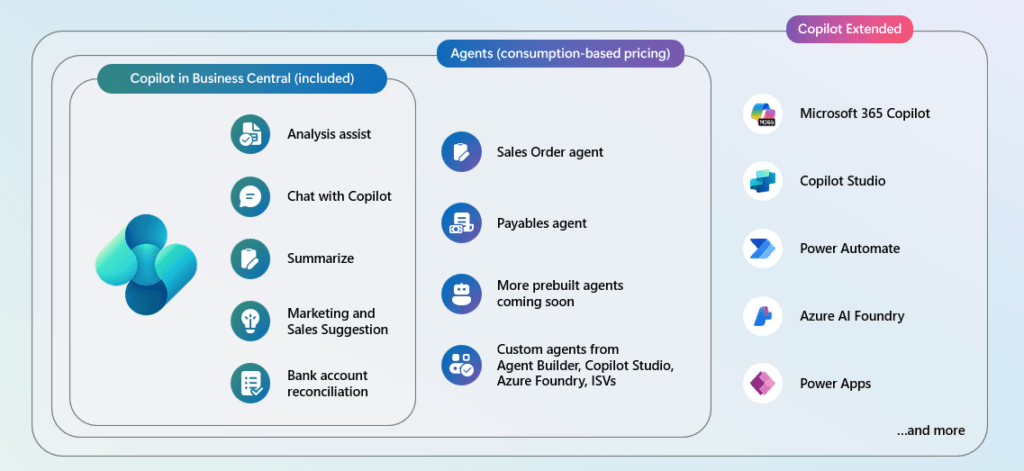
Before exploring agents specifically, it helps to understand where they sit within the broader Business Central AI ecosystem. Microsoft has built a layered intelligence stack that spans from included Copilot features through to fully autonomous agents and custom-built AI.
This layered model means organisations can start with the included Copilot capabilities and expand into agents and custom AI as their needs grow, without switching platforms or adding new infrastructure.
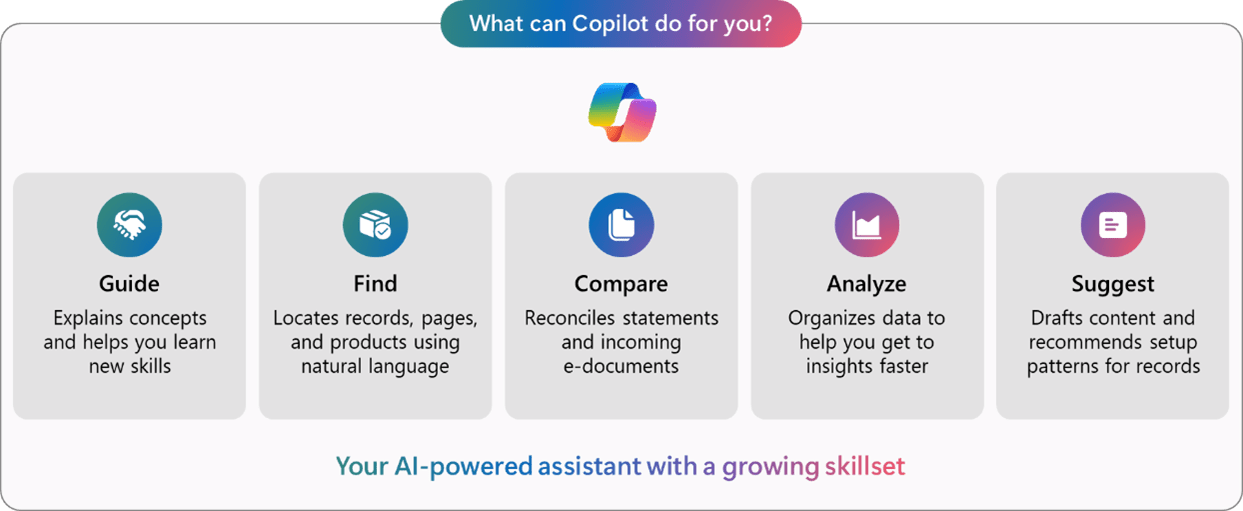
Before exploring each agent individually, it helps to be precise about what distinguishes agents from Copilot. Both sit within the same Business Central environment, but they serve fundamentally different purposes.
| Aspect | Copilot in Business Central | AI Agent in Business Central |
| How it works | Responds when prompted by a user | Operates autonomously on incoming triggers |
| Scope | Assists with a single task or record | Manages an end-to-end business process |
| Initiation | User-initiated | Event-triggered (e.g. email arrives, invoice received) |
| Examples | Summarise a record, autofill fields, match PO lines | Process a sales order from email, extract and draft an AP invoice |
| User Involvement | High, the user drives each interaction | Selective, human-approved, defined steps only |
| Activity Log | Not applicable | Full step-by-step log for review and correction |
| Autonomy level | On-demand queries and in-session help | Recurring, high-volume, process-driven workflows |
The distinction matters for planning. Copilot makes individual users faster. Agents reduce the number of steps that require a user.
The Sales Order Agent addresses one of the most persistent time drains in commercial operations: processing orders from customer emails.
It reads incoming customer emails, identifies the customer, checks available stock, drafts a quote, and, once approved, converts that quote into a confirmed sales order. It also manages updates to existing orders when customers respond to quotes already in the system. Every action is recorded in an activity log, so team members can review, adjust, or override any step before anything is posted to Business Central.
This matters most for businesses that manage a high volume of repeat orders, seasonal spikes, or customers who communicate primarily by email. The agent compresses the full order-capture cycle without removing human oversight from the critical confirmation step.
The Sales Order Agent reached general availability in November 2025.
| Aspect | Without the Sales Order Agent | With the Sales Order Agent |
| Order intake | The sales team monitors a shared inbox and manually picks up each order email. | Agent monitors the inbox continuously and picks up order emails around the clock. |
| Customer identification | Staff look up the customer record in Business Central manually | The agent identifies the customer automatically from the email and purchase history |
| Stock checking | Someone cross-references the product list and checks current availability | Agent queries stock levels in Business Central and flags any availability issues |
| Quote creation | The sales team builds the quote manually, line by line, in Business Central. | Agent drafts the quote with line items populated, ready for review. |
| Order confirmation | Staff convert the approved quote to a sales order and notify the customer | Agent converts the quote to a confirmed sales order once approved and updates the record |
| Existing order updates | Team members read replies to emails and manually amend open quotes or orders. | Agent detects replies relating to existing documents and updates them automatically. |
| Error risk | High during busy periods due to manual data entry and inbox volume | Reduced; agent applies consistent rules and logs every step for review |
| Staff time | Significant weekly hours spent on routine order intake and data entry | Focused on complex enquiries, customer relationships, and exceptions |
The Payables Agent addresses accounts payable, a function where manual effort accumulates quietly and consistently.
It monitors a designated Microsoft 365 inbox where vendors send invoices, extracts header and line details from PDF attachments, matches them to purchase orders or cost centres, applies your business’s existing policies and purchase history, and creates draft invoices in Business Central for a supervisor to review. Once approved, those drafts route through your existing approval workflow and get posted.
The agent also supports e-documents received via structured channels such as PEPPOL, which is increasingly relevant for UK businesses working across supply chains that require standardised electronic invoicing.
The Payables Agent became available in November 2025 for the United Kingdom, United States, Australia, and New Zealand, with additional countries including Canada, France, Germany, and others to follow.
| Aspect | Without the Payables Agent | With the Payables Agent |
| Invoice intake | Someone opens each email and downloads the PDF attachment manually | Agent monitors the inbox and imports PDFs automatically |
| Data extraction | A team member keys the vendor’s name, dates, totals, and line items into Business Central. | Agent extracts all header and line details from the PDF and applies the purchase history. |
| Matching | Staff cross-reference each invoice against open purchase orders | Agent matches against existing POs and flags exceptions for human review |
| Draft creation | Finance staff create purchase invoice records manually | Agent creates draft invoices ready for supervisor review |
| Approval routing | Manual handoff to approver, often by email | Automatic routing through your existing Business Central approval workflow |
| Audit trail | Dependent on staff discipline and manual documentation | A full activity log is maintained automatically for every invoice processed |
| Error rate | Higher during busy periods when volume increases | Consistent regardless of volume, exceptions flagged for human attention |
The built-in agents cover two of the most common, high-volume processes. For everything else, Microsoft has provided the infrastructure to build agents that reflect your specific workflows.
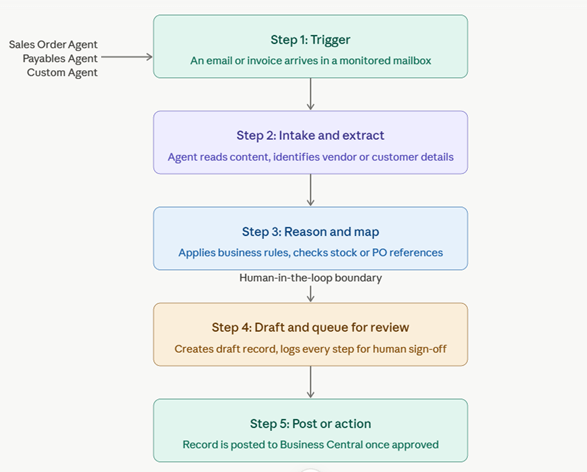
Agents do not operate freely. Every agent runs within a structured workflow that keeps humans in control of the decisions that matter most. The workflow above illustrates the five-stage cycle that Agents follow.
Every agent in Business Central works within a permission set that defines which data it can access and which actions it can take. Nothing gets posted to Business Central without passing through the approval steps you configure. The activity log records every action the agent takes, so a user can review what happened, correct it if necessary, and understand exactly how the agent reached each conclusion.
This is not automation without oversight. It is automation with a clear audit trail and a defined point at which a human decides whether to proceed.
The agent infrastructure in Business Central is built on five capabilities that work together:
| Component | What it does | Why it matters |
| Agent runtime | Executes multi-step tasks inside Business Central | Agents act like a real user: opening pages, navigating records, and posting actions |
| Permission boundary | Controls what data and actions the agent can access | Keeps agent activity within the scope you define |
| Activity log | Records every step the agent takes | Gives users full visibility and the ability to review or correct before anything is committed |
| Human-in-the-loop approval | Pauses at configured checkpoints for user sign-off | Ensures that critical actions, such as posting an invoice, require a human decision |
| Copilot credits | Usage-based billing for agent activity | Let us organisations scale agent use through prepaid or pay-as-you-go models. |
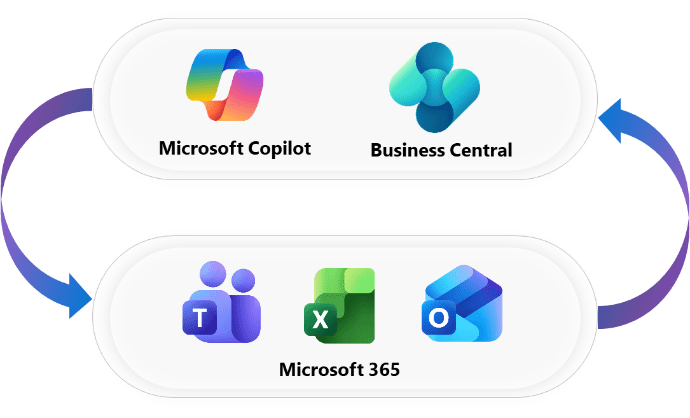
One of Business Central’s most practical advantages for UK SMBs is how naturally it connects to the Microsoft 365 applications most teams are already using.
Sales and Finance teams can interact with customers and vendors directly from Outlook, processing enquiries, managing sales quotes, and accessing full customer history, including previous discounts and payment records, without leaving their inbox. The Sales Order Agent extends this further by acting on order emails automatically.
Business Central data can be exported directly to Excel for analysis, edited, and published back with full business rule validation. Microsoft 365 Copilot now also brings ERP-connected data into Excel, enabling variance analysis, automated financial reconciliation, and data preparation in minutes rather than hours.
Teams can share Business Central records directly within chat and channels, look up business contacts alongside their interaction history, and edit records without switching applications. For organisations where decisions happen in Teams conversations, this removes a significant friction point.
For organisations with Microsoft 365 Copilot licences, Business Central now connects ERP data directly into the Copilot experience. This includes Copilot-guided financial reconciliation that understands your ERP policies, automated matching with instant insights, and personalised customer communications drafted with live ERP data such as payment history.
The productivity case is well supported. 73% of SMBs are already using AI tools in their business operations, and the businesses seeing the most measurable return are those applying AI to the specific tasks that consume the most time. 91% of AI-adopting SMBs say AI has boosted their revenue, and 78% of high-growth SMBs plan to increase their AI investment next year.
The consistent challenge has been that most automation tools require significant setup, integration work, or ongoing maintenance. Agents built natively into Business Central lower that barrier considerably. They connect to the data, permissions, and processes that are already in the system. There is no separate tool to configure, no new platform to connect, and no separate data pipeline to manage.
The Payables Agent alone addresses a function that consumes meaningful staff time in every finance team. The Sales Order Agent frees up commercial staff to focus on relationships and complex enquiries rather than routine data entry. Custom agents extend those time savings into whatever processes matter most to your business.
NHS trusts, independent healthcare providers, and social care organisations typically operate under tight resource constraints with high volumes of supplier invoices and procurement activity across multiple cost centres. The Payables Agent is well-suited to this environment. It removes the manual intake step for vendor invoices, automatically applies purchase order matching, and routes exceptions to the relevant budget holder rather than creating a queue for a central finance team to work through.
On the commercial side, healthcare businesses that supply products or services to other providers, such as medical equipment distributors or diagnostic laboratories, can use the Sales Order Agent to handle routine procurement orders from NHS or private sector customers. The agent processes incoming order emails, checks stock availability, drafts the quote, and converts it to a confirmed order once approved, freeing clinical support and commercial staff to focus on account management and complex orders rather than routine data entry.
Custom agents can extend further into healthcare operations. Stock monitoring agents can trigger reorder requests for clinical consumables before levels fall below safe thresholds, and project agents can flag timesheet or resource gaps on funded programmes or contract-based service delivery.
Non-profit organisations in the UK face a specific tension: accountability requirements are high, but administrative resources are typically limited. Finance teams are often small, managing supplier relationships, grant-funded cost centres, and restricted fund compliance alongside day-to-day operations.
The Payables Agent addresses the volume problem directly. Rather than a small finance team spending significant time each week processing supplier invoices, the agent handles intake, extraction, and draft creation automatically. The reviewer sees a prepared draft, checks it against the relevant fund or cost centre, and approves it. The full audit trail is maintained automatically, which is directly relevant to grant reporting and funder accountability requirements.
For non-profits that sell goods or services as part of their income mix, such as trading subsidiaries, membership organisations, or fee-charging social enterprises, the Sales Order Agent provides the same benefit it delivers in commercial settings. Routine orders are processed without requiring manual involvement at every stage, and the activity log supports the transparency that funders and trustees expect.
Custom agents can also be configured to flag expenditure that approaches or exceeds budget thresholds for specific restricted funds, giving finance leads early visibility rather than a month-end surprise.
Sales teams managing large volumes of repeat orders can configure the Sales Order Agent to process routine orders automatically while flagging non-standard requests for manual handling. This reduces order processing time and supports consistent turnaround during peak demand.
Firms with high volumes of supplier invoices, from contractors, venues, or technology providers, can use the Payables Agent for the manual intake step entirely. Finance teams focus on exceptions, approvals, and cash planning rather than data entry.
Custom agents can monitor production data, trigger reorder requests when stock falls below defined thresholds, and update job records as field engineers complete tasks. The Agent Design Experience enables these workflows to be built and evaluated without developer involvement.
Businesses integrating Business Central with Shopify can use agents to automate order validation, flag fulfilment issues, and generate customer communications based on order status, all within the existing Business Central environment.
Mazik Global UK is a Microsoft Solutions Partner with firsthand experience deploying and configuring Dynamics 365 Business Central for UK businesses. Our approach to agent implementation is structured to move organisations from assessment to live deployment in a controlled, low-risk way.
The organisations that get the most from AI are not always those with the largest budgets or the most advanced infrastructure. They are the ones who have connected AI to the actual work.
Business Central agents represent exactly that kind of connection. They do not sit outside your processes waiting to be consulted. They operate inside the system where your data lives, working within the boundaries you define, and handing off to a human at the right moment. 3 in 5 small businesses are planning to implement AI within two years, and the window to build that capability ahead of the market is still open
The built-in Sales Order and Payables agents are production-ready. The Agent Design Experience makes custom automation accessible without specialist developer resources. And the governance framework ensures that human oversight remains where it should be, at the decisions that matter.
For UK businesses already running Business Central or evaluating it as part of a broader Microsoft investment, the agent capabilities now available represent a straightforward, measurable step towards more efficient operations.
Contact Mazik Global to arrange a Business Central AI Agent Readiness Assessment and find out where automation can deliver the most immediate value.
There is a reasonable argument that businesses have never faced a more complex operating environment. Supply chain unpredictability, shifting trade…
Every support team knows the routine. An email arrives, someone reads it, opens the CRM, creates a case, assigns a…
Introduction Most Finance teams do not need a consultant to tell them procurement is broken. They already know. They see…